

It’s one of the questions we get the most: Which AI tool should we choose? There are sooo many.
There are many, and it changes fast. Do you pick a fashion-specific tool with a nice interface and fashion features, or do you go with a generic model like ChatGPT or NanoBanana and tailor it yourself? Are they all the same? Does it matter at all?
Think of a furniture maker who just bought a new type of electric saw. It is fast, powerful, nimble; they say it can cut unique shapes. First, you need to learn how to handle it, fit it into your workshop, and get comfortable with it. So the environment, layout, and workflow in your workshop matter. Do you have an extra plug, an extension cord, safety measures, a sawdust collector, enough space to move around with it, etc.?
The short answer is that what matters most is how you are going to use your new tool. Do you have a goal for it and the “setup” to benefit from it the most?
Where AI creates value
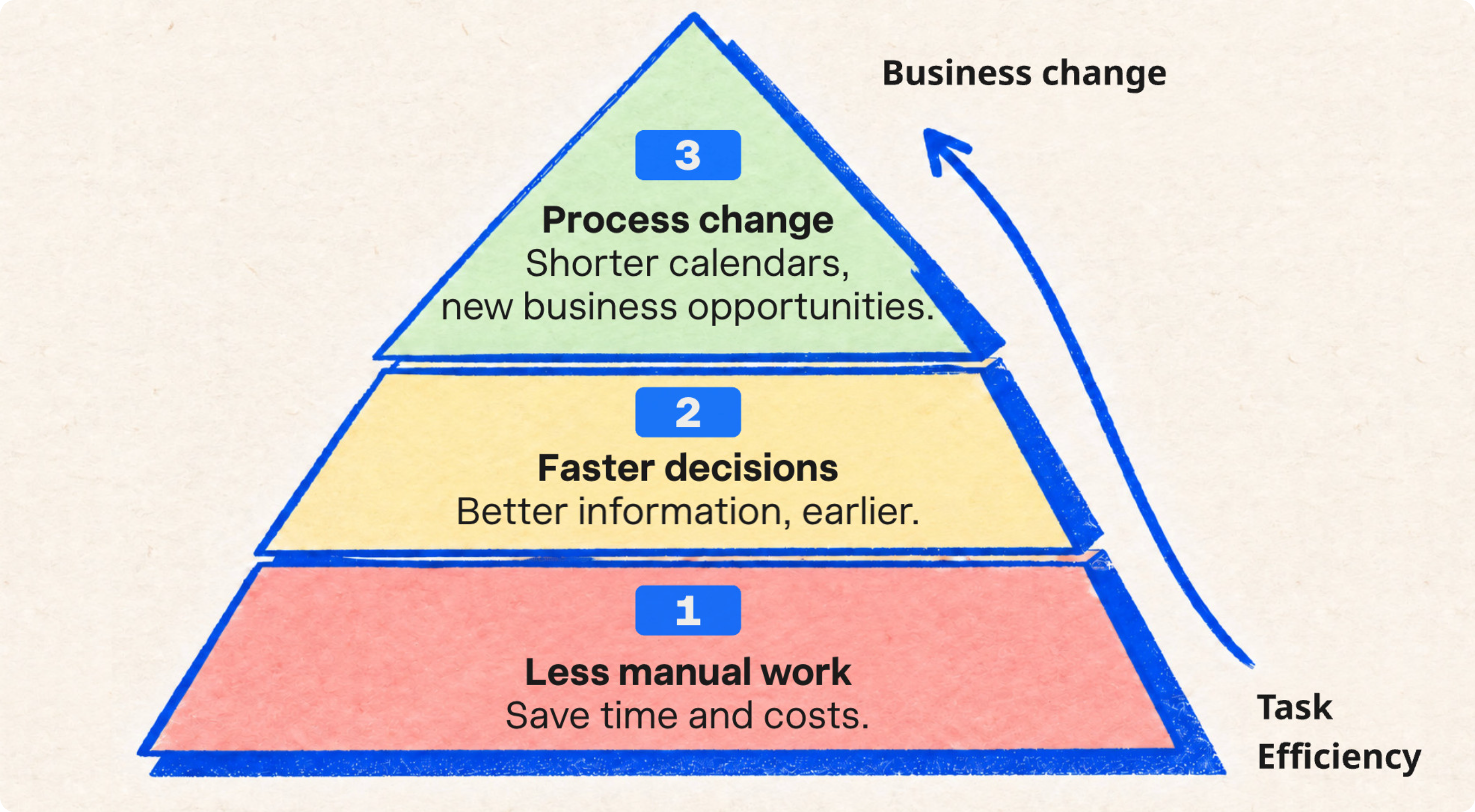
For brands, that “new thing” can be a shorter calendar, fewer physical prototypes, earlier insight, because they changed their way of working.
Systemic changes that create new business opportunities - that is the bigger opportunity.
The first 2 levels are relatively easy to achieve: replace existing tasks with more automation. For bigger business impact, you move up, connect your tools and data, and start shifting your processes.
The third is where the calendar actually gets shorter. Not because everyone works faster, but because the sequence changes.
That is the kind of thinking behind Design, Sell, Make.
Commercial break: AI tools, new workflows, integrations, data cleanup. Feeling slightly nervous? Breathe. We’ve got your back. We help you decide where to start, make a plan and then actually build it - connecting your data and tools and making the solution work. You don’t need to solve everything at once.
Now for the checklist.
Some practical things you might find useful.
Start with your use case
Be specific about the problem you want to solve. It usually falls into these buckets.
These use cases do not necessarily require three different tools. The same tool can be configured in different ways. But you need to know what you want to solve before you start. It may eventually be all three. Still, prioritize them and choose one clear starting point. Thinking of use cases alone will save you time, money, and frustration; trust me.
Idea to sketch review: First design iterations, key looks. This is about design direction, helping a team make decisions faster, not generating a final image.
Design to tech pack: Design and tech-pack imagery. The image cannot only be pretty. It needs to communicate the design intention accurately enough to support product development and manufacturing.
Commercial images: Sales- and marketing-ready output that can be used to present or test products before traditional photography would normally be possible.
Ask the questions that matter
It is mind-blowing to see images created so quickly and easily. Enjoy that moment… But pull yourself together and think a few steps ahead. How will this work across a few hundred styles, multiple product groups, and an entire organization?
Think beyond the tool. It should not only make single tasks faster and easier; it should also let you make systemic changes further down the road.
Some suggestions:
Check if you can use your brand assets, product data, and creative standards. This will protect you from being dependent on one person.
Can you create repeatable workflows, or does every output start with another blank prompt? Think about the volume you do and the consistency you would like to see.
Does it have API’s and can you connect to the tools you already use, such as your PLM, DAM and collection overview? Important: when you decide to change your calendar, integrations and automation are key.
AI is part of something bigger
Everything changes when your data is connected and tools start to talk to each other.
Let me take it a step further, past the first stage of cutting manual work. The biggest impact we see is when tools are connected and AI starts to do processes in the background.
2D sketches or 3D renders can automatically be enhanced with your brand AI context (Brand DNA).
Images, drops, and collections are no longer a collection of images in a folder and static PDFs; they turn into a real-time, data-connected collection overview. Think of it as your dashboard that everyone has access to.
This is also where you apply your brand intelligence. Are we making the right decisions? Is our line commercial enough? Is the color balance right? Feeding the right door sizes? Is all the sales feedback covered?
The team reviews, comments and makes decisions in the collection overview. When a product is signed off, it moves to the next gate. The right assets are created, renamed, cropped and delivered where they need to go.
Much of it is AI, not AI sitting in a separate tool, waiting for someone to remember it exists. It is AI working inside the context of your brand, your data and your workflow
Choosing the tool is only the beginning
Back to the workshop. The new saw doesn’t make a better furniture maker on day one.
But it does introduce new opportunities. We have seen and helped build many different workshops for all different teams. Much of it comes down to making tech fit the craft, people, and their way of working.
That is what we love and do best.
Want to know more? ping us zoomin@enhancethat.fashion